Updates
Recent CareCru Updates
We’ve enhanced how SMS delivery errors are displayed in Chat to give you clearer visibility and more control when messages cannot be delivered.
With this update, you’ll now see notifications when a message is rejected by the patient’s mobile carrier. Carriers may reject messages for a variety of reasons, such as invalid phone numbers, SPAM filtering, or carrier-specific restrictions.
🆕 What’s Changed
1. More Transparency into Carrier Rejections
When a carrier rejects a message, you’ll now see a “message not sent” notification in chat.
Hover over the failed message to see the reason and suggested next steps. Examples include:
- The number may be a landline or not able to receive texts. Please confirm the patient’s contact info is accurate.
- The message was blocked by the carrier’s SPAM filter. Please contact CareCru Support.
- The recipient's server was unavailable or not responding. Please confirm the patient’s contact info is accurate.
- The recipient carrier did not accept the message. Please try again or confirm the patient’s contact info is accurate.
- US 10DLC registration is required to text patients with US carriers. Ask if your patient has a Canadian number or contact CareCru Support to discuss 10DLC registration. (Canadian Accounts Only)
- The number is invalid. Please confirm the patient’s contact info is accurate.
- Message blocked due to carrier volume limits. Please try sending again later.
- Message blocked as the recipient has opted out of SMS. Please ask the recipient to text “Start” to opt back in to receive text messages.
- The message was rejected by the carrier. Please confirm the patient’s contact info is accurate.
2. Retry Option for Temporary Failures
Some carrier rejections are temporary. In these cases, you’ll now see a Retry button next to the failed message.
Clicking Retry will attempt to resend the same message without retyping.
⚠️ Note: Retried messages may still fail if the carrier continues to block delivery. These restrictions are determined by the patient’s mobile carrier and are outside of CareCru’s control.
We’re excited to share an update that will make managing recalls in Tracker even smoother!
From now on, any CareCru Logged Recalls will:
- Automatically populate into the patient’s pending recare appointment with a note in real time.
- Instantly update the follow-up date after logging the recall.
The note will display:
- The action taken (e.g., Logged Recall),
- Any manual notes you’ve added, and
- The first name and last initial of the team member who logged the recall.
Example:
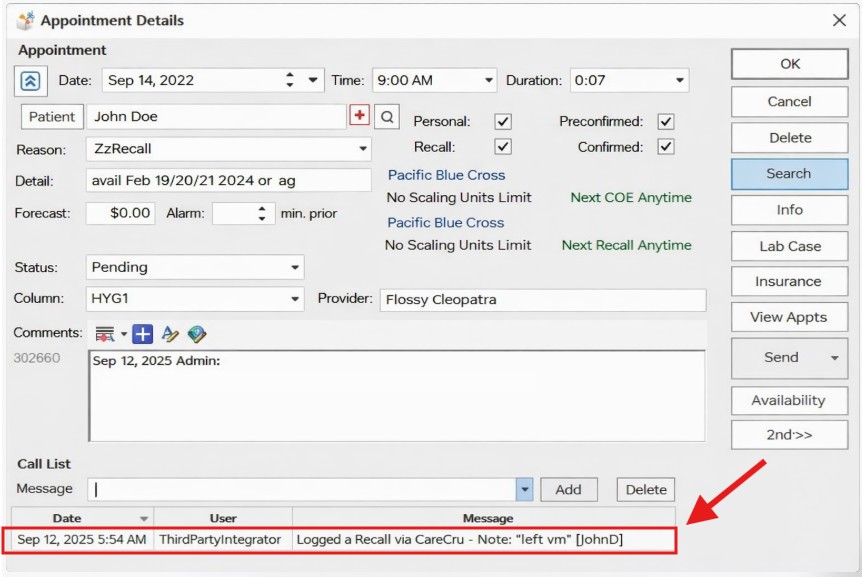
We hope this enhancement helps streamline your recall process and keeps your patient records even more accurate.
If you have any questions, please don’t hesitate to reach out to our support team.
A new Manager role has been added to our CareCru User permissions. This role provides full access to all account configuration settings, while keeping multi-practice access exclusive to the existing Owner role (for Enterprise clients).
If you’d like a user to be upgraded to the Manager role, please note that this change must be made by your Regional or Area Manager. Our Support team is not able to update roles directly, so we encourage you to connect with your Regional/Area Manager if you’d like to explore this option.
For a detailed overview of the Manager role permissions and step-by-step instructions on how to upgrade a user, please see the below article:
How user roles are defined
We’re excited to announce an enhancement to the New Patient Welcome workflow that many of our customers have been asking for!
What’s new?
Patients who book same-day appointments will now receive the New Patient Welcome message by default. This change helps ensure that even last-minute bookings get the full welcome experience—allowing patients to fill out any required forms ahead of time, saving valuable time for both the patient and front-desk staff.
Why did we enable this by default?
The vast majority of CareCru practices requested this change in functionality. Enabling it by default ensures a consistent, time-saving experience for all new patients, no matter when they book their appointment.
Prefer not to send same-day messages?
No problem—this setting is easy to manage. Simply go to Account Settings > Donna and select New Patient Welcome.
Click on the settings ⚙️button and toggle the Send New Patient Welcome messages for appointments booked on same day option off.


Haven't set up New Patient Welcome automation yet?
Read below to find out how to:
New Patient Welcome Automation
👂 We’re always listening and building with your feedback in mind. Thank you for helping us improve the new patient experience!
When attempting to accept an online appointment request, the gender was not populating which forced the user to have to add it manually before being able to accept the appointment. This has now been resolved.
*For Tracker Practices Only
When linking an online appointment request to an existing pending appointment in Tracker, the appointment status was not updating from Pending to Booked. Only the date/time of the pending appointment is being updated from the online appointment request. This is now resolved.
Accounts set up with Admin user role access, should be able to edit and delete other accounts that are set as either Admin or User.
This function was no longer working, and has now been resolved.


